Follow the example of over 1,000 users during winter break—reduce your energy usage when you’re not at home. Our analysis shows that those who used the “Scheduling” feature in Ngenic Tune reduced their energy consumption by an average of 41%. With Easter approaching, you have the same opportunity to save both energy and money.
When a house is empty, the heating often continues as usual. But our data from the winter break shows that there’s a simple way to avoid unnecessary energy use.
We analyzed user data from Ngenic Tune and examined how the planning feature was used—and what impact it had.
Clear Results from Winter Break
More than 1,000 households used the feature PScheduling feature to adjust the temperature when the home was unoccupied.
The result:
- On average, 41% lower energy consumption for heating
- That's equivalent to about 550 SEK in savings in just one week
- Continued comfort upon returning home
The savings vary depending on the house, the heating system, and the weather. But the pattern is clear – Lowering the temperature in an empty house makes a big difference.
In the run-up to Easter – the same opportunity
Easter is one of the biggest travel weekends of the year. Many people leave their homes for several days—sometimes even longer.
Despite this, the heating is often left at the same setting.
By using scheduling, the heating can instead be adjusted automatically:
- The temperature is lowered when no one is home
- Adjusted based on how long the home has been vacant
- It's rising again just in time for my return home
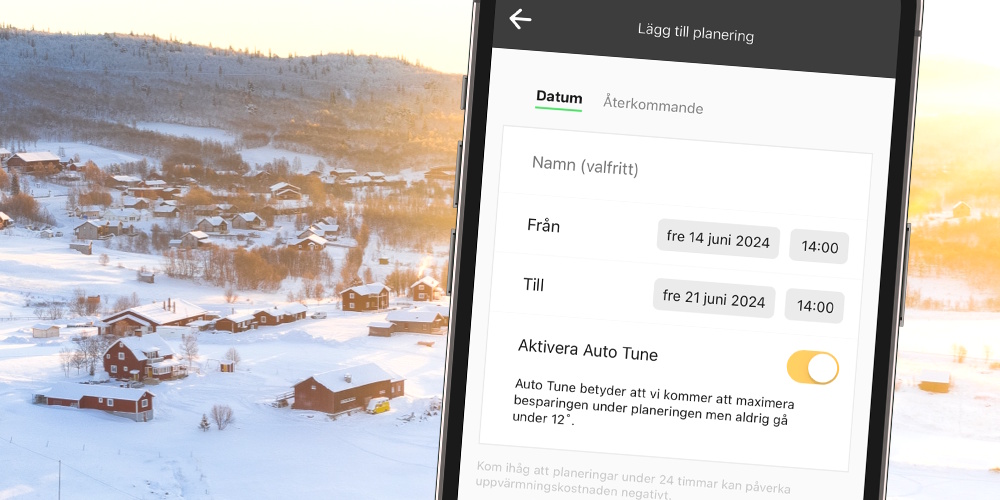
Different types of schedules in the app
- Schedule Settings
Ideal for lowering the temperature when you go on vacation or temporarily raising the temperature for a visit to a summer cottage.
With the Auto Tune feature, the schedule will ensure that the temperature does not drop below 12 degrees.
- Recurring Schedules
Can be used to set a schedule for the week—for example, to lower the temperature in the mornings when no one is home, or to adjust to other weekly schedules.
A simple feature with a big impact
Planning in Ngenic Tune ensures that the heating adapts to how the home is actually used—instead of running unnecessarily.
No manual adjustments are needed while you're away, and you'll enjoy the same level of comfort when you get home.
A simple Easter tip
Make sure you don't heat an empty house.
Learn more about how to use the Planning feature in Ngenic Tune